


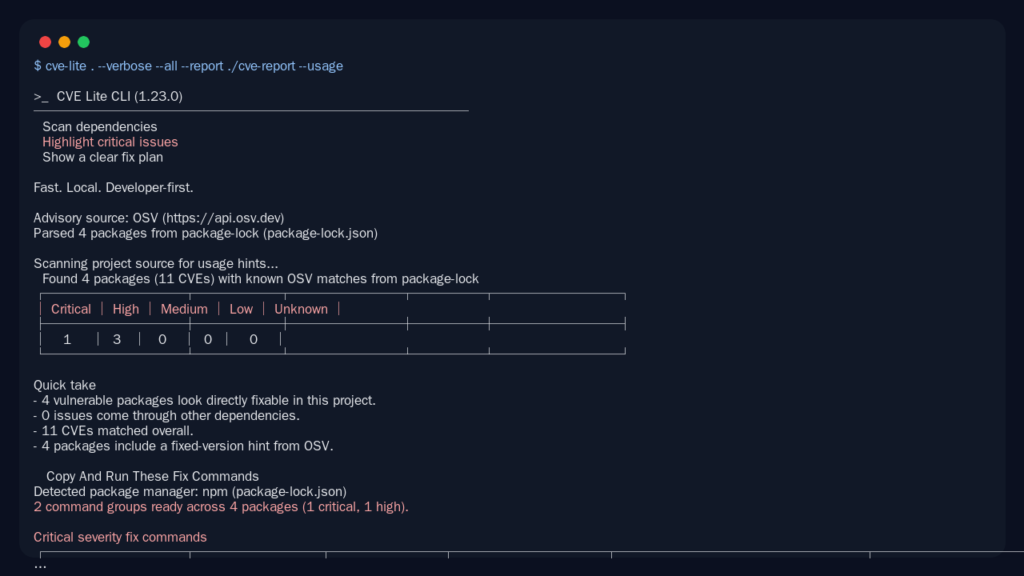
CVE Lite CLI is a vulnerability scanner for JavaScript and TypeScript dependencies that reads from your local lockfile, queries OSV, and then proposes a remediation plan. After a real test on a small intentionally vulnerable project, my take is simple: it’s worth trying if you want quick feedback in the terminal, no SaaS account required, no heavy pipeline.
What is CVE Lite CLI?
CVE Lite CLI is an OWASP Incubator tool that scans npm, pnpm, Yarn and Bun dependencies. Its angle isn’t just listing CVEs, but answering the real developer question: what do I actually need to update right now?
It reads the lockfile, queries the OSV database, distinguishes direct from transitive dependencies, and generates fix commands. It can also produce an HTML report, JSON, SARIF for GitHub Code Scanning, and run an automatic fix mode.
| Point tested | Observed result |
|---|---|
| Version tested | 1.23.0 from the GitHub repository |
| Runtime | Node.js 20.20.2 |
| Installation | npm ci, TypeScript build, full test suite |
| Project tests | 36 Jest suites, 485 tests passed |
| Use case | npm project with vulnerable lodash, minimist, ws, serialize-javascript |
| Outputs | Terminal, JSON, SARIF, HTML report, fix mode |
Installing CVE Lite CLI
The standard way is straightforward:
npm install -g cve-lite-cli
cve-lite /path/to/project
For this test, I deliberately cloned the repository and ran the tool from source:
git clone https://github.com/OWASP/cve-lite-cli /tmp/cve-lite-cli
cd /tmp/cve-lite-cli
npm ci
npm run build
npm test -- --runInBand
In my container, the direct install into /tmp initially failed on an npm postinstall step with Permission denied, which is typical when /tmp is mounted with execution restrictions. So I kept the clone in /tmp for inspection, then ran the install in a separate executable temp directory that was cleaned up afterward. The build went through fine, and the test suite came back with 36 suites and 485 tests passing.
CVE Lite CLI in Practice
I created a small npm project with four dependencies known to trigger alerts:
npm init -y
npm install lodash@4.17.20 minimist@0.0.8 ws@7.4.5 serialize-javascript@2.1.1 --package-lock-only
I also added a src/index.js file that imports lodash, minimist and ws, but not serialize-javascript. The idea was to see whether the usage analysis option would surface the difference between an imported package and one that’s just present in the lockfile.
Main command:
cve-lite . --verbose --all --report ./cve-report --no-open --usage --no-cache
Result: CVE Lite CLI parsed 4 packages from package-lock.json, found 4 vulnerable packages and 11 CVEs in total. The summary showed 1 critical and 3 high severity issues, with ready-to-copy npm commands.
What I appreciated: the output doesn’t stop at a CVE table. It groups fixes by severity, shows the current version, the target version, the number of versions tested, and whether the package is actually used in the code. In my test, serialize-javascript was correctly flagged as unused, while lodash, minimist and ws were linked back to src/index.js.
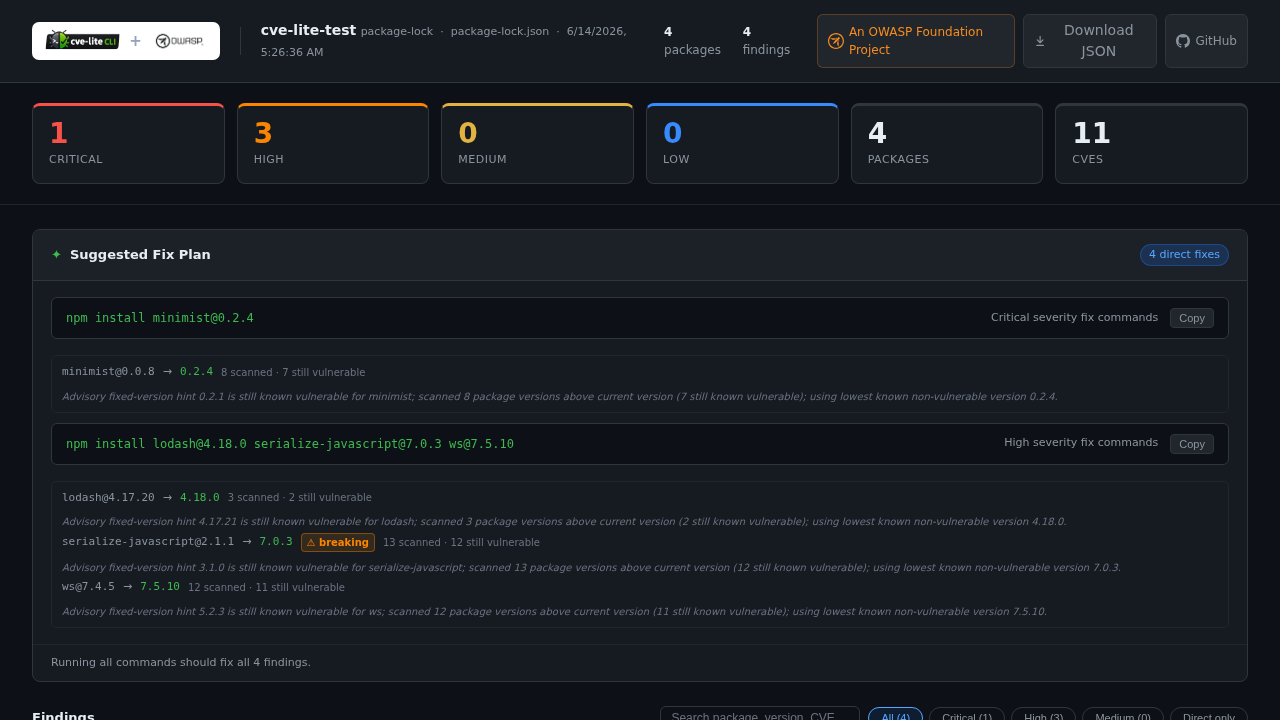
The HTML report is genuinely useful too. It gives an actionable view for a review with a lead dev or a client: severity counters, fix commands, a filterable table, and full vulnerability details.
I then ran the machine-readable outputs:
cve-lite . --json
cve-lite . --sarif
The JSON confirmed the numbers: packageCount: 4, findingCount: 4, and an aggregated command npm install minimist@0.2.4 lodash@4.18.0 serialize-javascript@7.0.3 ws@7.5.10. The SARIF was written to a .sarif file, ready for GitHub Code Scanning integration.
CVE Lite CLI Fix Mode: What Actually Happens?
I tested fix mode on a copy of the project to keep observation and remediation separate:
cve-lite . --fix --verbose --no-cache
Fix mode modified package.json and package-lock.json, then rescanned. It reported 4 fixes applied: minimist to 0.2.4, lodash to 4.18.0, serialize-javascript to 7.0.3, and ws to 7.5.10.
After the fix, the scan only surfaced one medium-severity vulnerability on serialize-javascript@7.0.3, with a suggestion to move to 7.0.5.
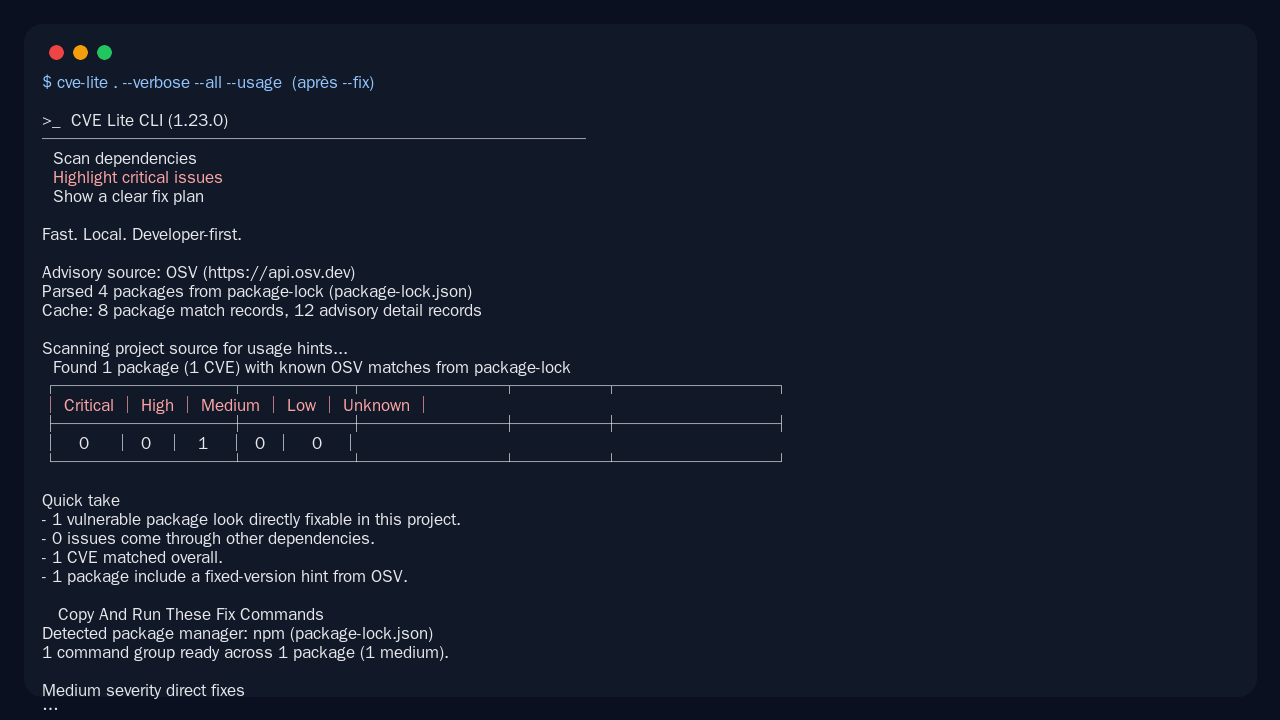
My take: fix mode speeds up the cleanup, but I wouldn’t run it blindly on a client repo. I’d use it on a dedicated branch, with application tests running afterward.
What I Like About CVE Lite CLI
The biggest strength is readability. In security or DevOps consulting, the problem isn’t just knowing a dependency is vulnerable. The real problem is turning that into action without burning half a day on tickets and dashboards.
Things I particularly appreciate:
- local lockfile reading, no account required
- support for npm, pnpm, Yarn and Bun
- clear separation of direct and transitive dependencies
- ready-to-run fix commands
- a shareable HTML report
- JSON and SARIF for automation
- usage analysis, handy for prioritizing what’s actually imported
The Limits of CVE Lite CLI
CVE Lite CLI doesn’t prove that a vulnerability is exploitable in your application. The tool says as much in its own coverage notes: it checks dependency versions against OSV, not full runtime behavior.
A few limits worth keeping in mind:
- it doesn’t scan container images, binaries, secrets or IaC
node_modulesisn’t verified during the scan, the lockfile is the source of truth- monorepo workspaces are described as partially modeled in this version
- fix mode needs to be followed by your own tests, especially with major version jumps
- result quality also depends on the OSV data itself
I also noticed that the output formats aren’t all combinable: the HTML report, JSON and SARIF each require separate runs. Not a dealbreaker, but something to account for when writing a clean CI script.
Does CVE Lite CLI Actually Work?
Yes, in my concrete test, it works. The scanner found the expected vulnerable packages, identified which dependencies were actually used in the code, produced an HTML report, JSON, SARIF, and fix mode genuinely modified the npm files.
The key point: it doesn’t replace a proper patch management policy. It accelerates the first pass. For a freelancer, a small team or an open source project, that’s already a lot.
I can see it fitting naturally into three scenarios:
- before pushing a branch, to avoid surprises
- in a lightweight CI, with a severity threshold or SARIF
- for a quick audit, to turn a lockfile into an understandable remediation plan
Should You Adopt CVE Lite CLI?
My verdict: try it, then adopt it on JavaScript projects where you want a short remediation loop.
I wouldn’t pitch it as a complete supply chain security platform. It’s not Snyk, Socket or a CNAPP console. But as a local, free, readable, developer-oriented tool, CVE Lite CLI checks a lot of boxes.
If you maintain JS or TS projects, the cost of trying it is low, and the clarity gain is real.
FAQ
Does CVE Lite CLI send my code to the cloud?
No, in the tested workflow it reads the local lockfile and queries OSV for advisories. It does not perform full source code analysis server-side.
Does CVE Lite CLI replace npm audit?
Not exactly. I see it more as a more readable complement, especially for the fix commands, the HTML report, the SARIF output and the direct vs. transitive distinction.
Can CVE Lite CLI be used in CI?
Yes. The JSON and SARIF outputs are suited for automation, and a severity threshold can be used to fail a pipeline. Just keep in mind you’ll need to run the formats separately if you also want to generate an HTML report.