


CVE MCP Server is a Python MCP server that gives a client like Claude access to security intelligence tools: NVD, EPSS, CISA KEV, OSV, GitHub, MITRE, and several threat intel sources. My quick verdict: worth trying if you do vulnerability monitoring or patch triage, but you have to accept an MCP layer that is still very engineer-facing and a few blind spots depending on the APIs.
CVE MCP Server: what is it?
CVE MCP Server turns vulnerability sources into tools callable by an LLM via the Model Context Protocol. The idea is straightforward: instead of opening NVD, CISA KEV, FIRST EPSS, OSV, and GitHub manually, the model can call dedicated functions and cross-reference the results.
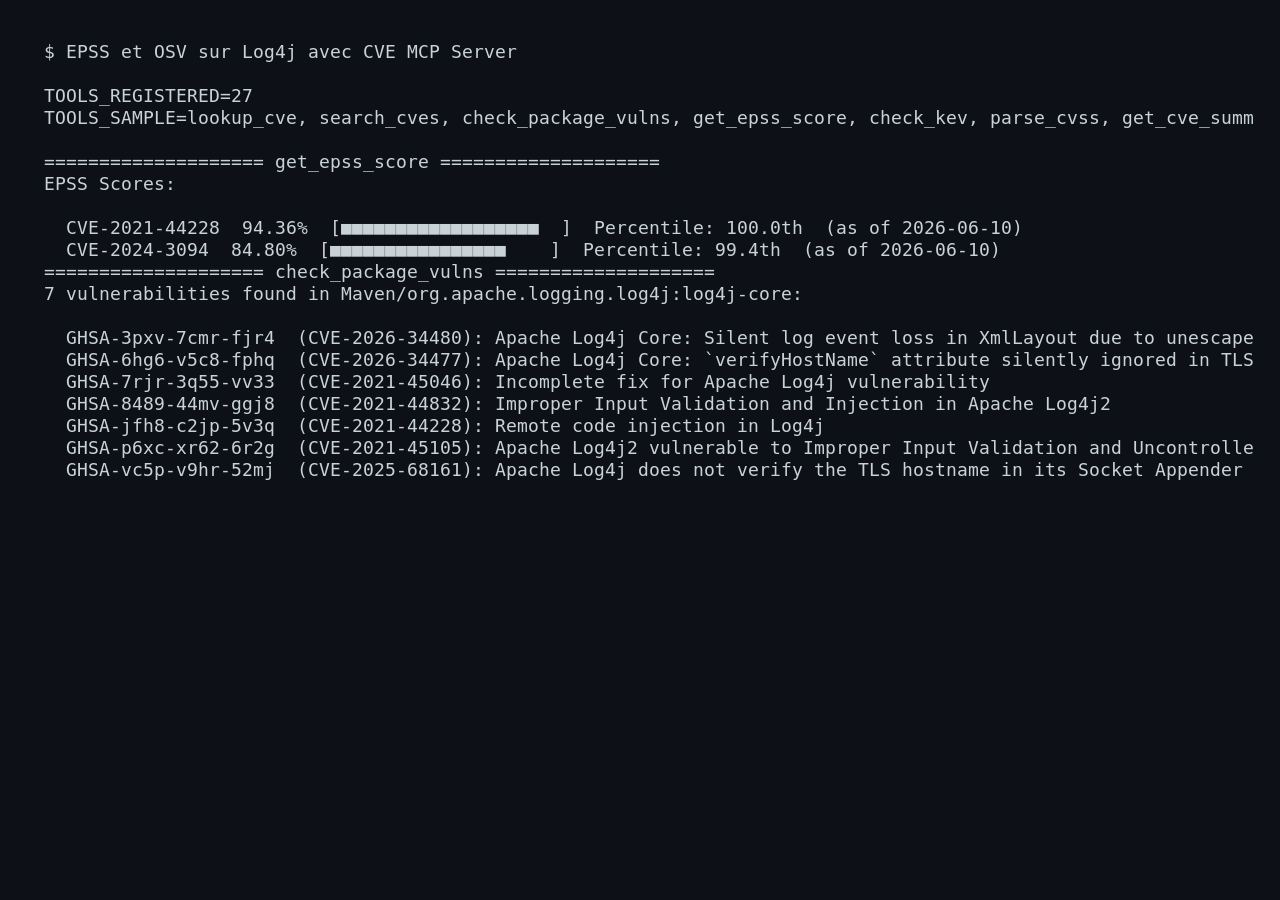
The repository advertises 27 tools across 21 sources. In my test, the server registered 27 MCP tools at startup, including lookup_cve, get_epss_score, check_kev, check_package_vulns, calculate_risk_score, and compare_cves.
This is not a web app with a dashboard. It is an infrastructure building block for connecting an AI assistant to security data. The right audience is security teams, DevOps, AppSec, freelancers doing triage, and anyone who wants to hook an assistant up to reliable sources.
| Point | Observed detail |
|---|---|
| Language | Python 3.10 or higher |
| Server | FastMCP via stdio |
| Tested installation | pip install -e .[test] |
| MCP tools | 27 tools listed at startup |
| Tested sources | NVD, CISA KEV, FIRST EPSS, OSV, GitHub |
| Required keys | Not for my basic scenario, but useful for GitHub, NVD, Shodan, VirusTotal |
| Tested case | Log4Shell triage, CVE-2021-44228 |
Installing CVE MCP Server
I cloned the repository into /tmp, installed the dependencies in an isolated Python environment, then ran the tests. First surprise: the MCP tests in the repository use the command python -m cve_mcp.server. In my container, that initially pointed to the system Python rather than the venv, so the MCP tests could not find the module.
Once PATH and PYTHONPATH were set correctly, the test suite passes:
git clone https://github.com/mukul975/cve-mcp-server.git
cd cve-mcp-server
python3 -m venv .venv
.venv/bin/python -m pip install -e '.[test]'
PYTHONPATH=$PWD/src PATH=$PWD/.venv/bin:$PATH .venv/bin/python -m pytest -q tests
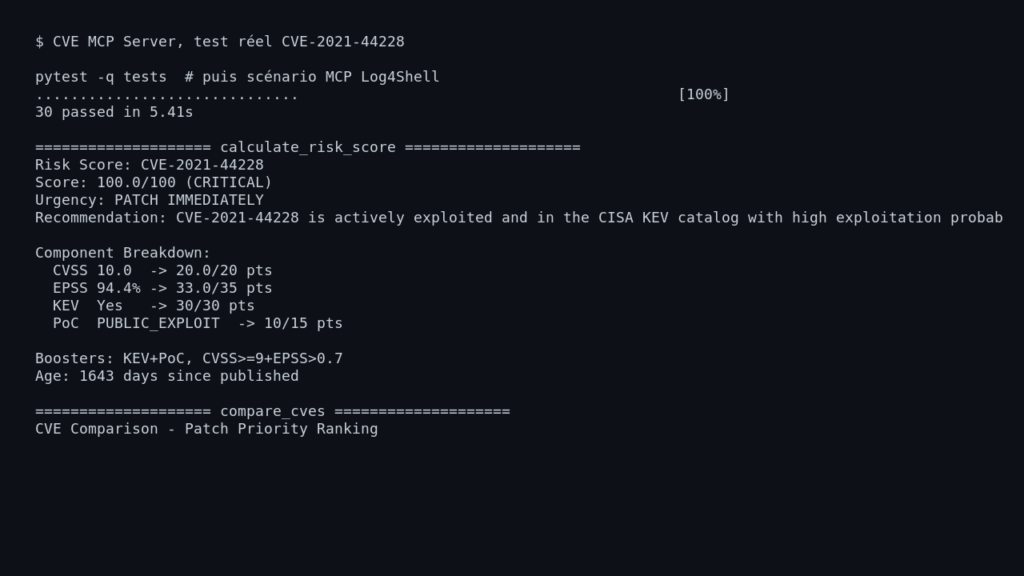
Actual result: 30 passed in 5.41s.
On the launch side, the server speaks stdio MCP. It loads the CISA KEV catalog at startup. In my run, it fetched 1617 entries from CISA, then responded to tool calls from a Python MCP client.
CVE MCP Server in practice: my Log4Shell scenario
I wanted a concrete case, not just a startup check. So I simulated a triage question: “what should I do with CVE-2021-44228, Log4Shell, and how should I prioritize it against CVE-2024-3094?”
I called these MCP tools:
lookup_cve(CVE-2021-44228)
get_epss_score(CVE-2021-44228,CVE-2024-3094)
check_kev(CVE-2021-44228)
check_package_vulns(org.apache.logging.log4j:log4j-core, Maven, 2.14.1)
calculate_risk_score(CVE-2021-44228)
compare_cves([CVE-2021-44228, CVE-2024-3094])
health_check()
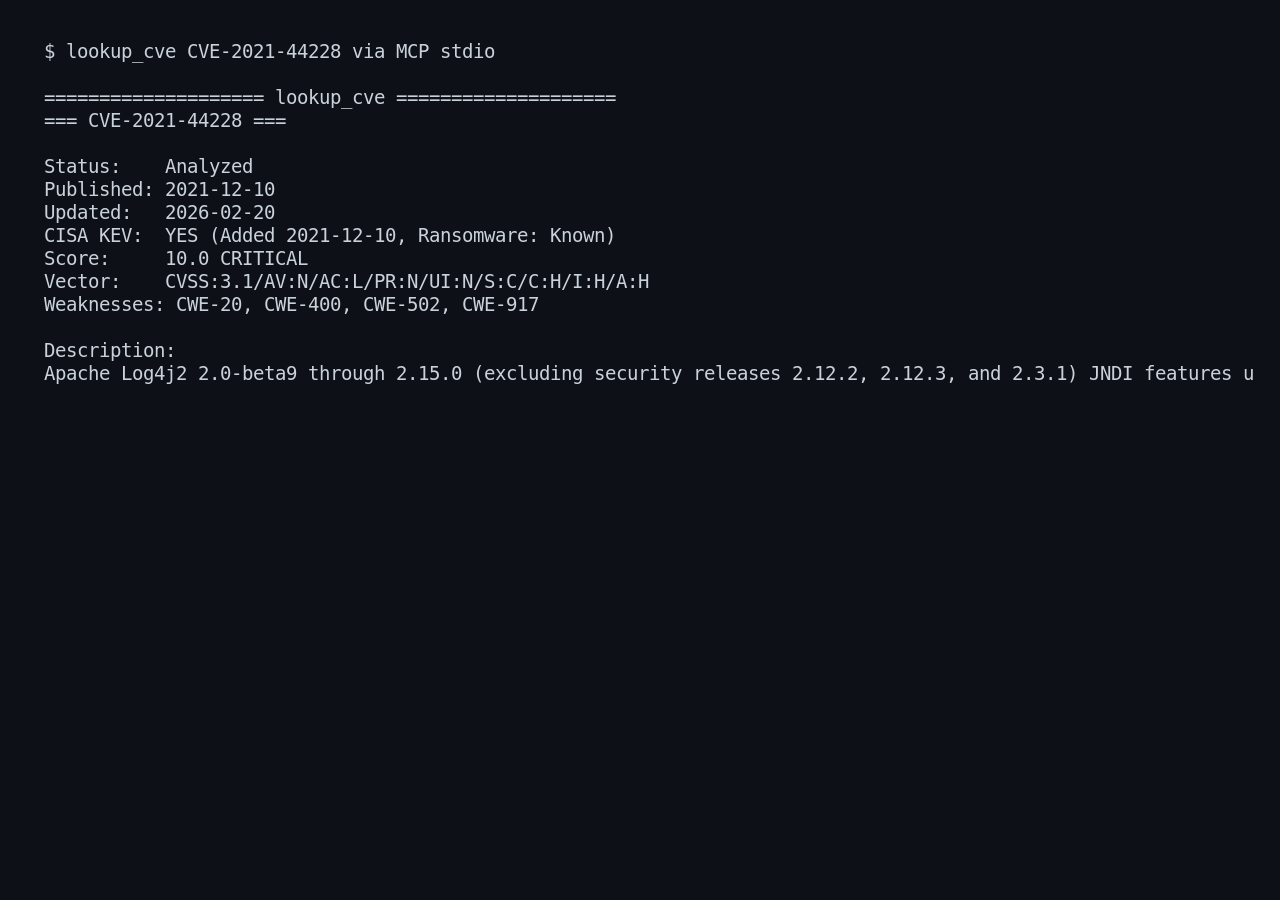
The output is useful. lookup_cve returns the NVD status, publication date, last modified date, CWEs, CVSS score 10.0, CVSS vector, and the full vulnerability description.
check_kev confirms that CVE-2021-44228 is in the CISA KEV catalog, with known ransomware use, the date it was added, and the remediation deadline. get_epss_score also gives a strong priority signal: 94.36% EPSS probability for Log4Shell and 84.80% for CVE-2024-3094 at the time of my test.
The most interesting tool is calculate_risk_score. For Log4Shell, the server produced:
Risk Score: CVE-2021-44228
Score: 100.0/100 (CRITICAL)
Urgency: PATCH IMMEDIATELY
Recommendation: CVE-2021-44228 is actively exploited and in the CISA KEV catalog with high exploitation probability; apply vendor patches immediately.
The comparison is readable too: Log4Shell comes first at 100/100, CVE-2024-3094 comes second at 65.7/100 with a patch recommendation within 72 hours.
What I like about CVE MCP Server
The real strength is the correlation. A high CVSS score alone is not enough. Combining CVSS, EPSS, KEV, and the presence of a PoC gives an answer much closer to real-world triage.
I also like the output format. It is not raw JSON that is unreadable for humans. The responses are text-based, ready to be injected into a conversation or a report. For an AI assistant, that is practical: the model already receives a structured summary.
Another good point: the server does not require a paid key to get started. My basic test worked with public APIs. Keys still matter for lifting rate limits or accessing Shodan, VirusTotal, AbuseIPDB, and GitHub without 401 errors on certain searches.
Finally, the test suite passes when the Python environment is properly wired up. That is reassuring for a building block you would want to integrate into a toolchain.
Limitations of CVE MCP Server
The first limitation is the developer experience. The project is clean, but it remains very much an “MCP server.” If you are looking for a ready-to-click web interface, this is not the right tool.
Second limitation: some APIs quickly impose their constraints. During my test, searching for Nuclei templates via GitHub Code Search returned a 401 without a GitHub token. It is not a fatal bug, but you need to plan for keys if you want full coverage.
Third limitation: OSV package naming can trip you up. A naive call on log4j-core in Maven returned nothing. The correct call was org.apache.logging.log4j:log4j-core, and then OSV returned 7 vulnerabilities. That makes sense from a Maven ecosystem perspective, but an assistant will need clear guidance to avoid this false negative.
One last detail: the CVSS parser displays Version: 1 for a CVSS 3.1 vector. The score itself is correct (9.8), but that line can raise eyebrows in a report.
Does CVE MCP Server actually work?
Yes, for the core use case. I watched the server make real HTTPS calls to NVD, CISA, FIRST EPSS, OSV, and GitHub, then produce actionable output: CVE summary, KEV status, EPSS scores, package vulnerabilities, risk score, and patch ranking.
It does not replace an analyst. It automates collection and provides an initial prioritization. That is exactly where I find it useful: cutting out the time wasted copy-pasting across five websites, not making remediation decisions on its own.
Should you adopt CVE MCP Server?
My verdict: worth trying if you already have an MCP client or an internal assistant. For a DevOps or security team doing CVE monitoring, it is an interesting and fairly concrete building block.
I would not adopt it as a single source of truth. I would use it as an aggregator, with logs, caching, configured API keys, and human validation before any decision. For a security freelancer, this is exactly the kind of tool that can speed up a dependency audit or an urgent client advisory.
If you are not using MCP yet, you can probably skip this for now. If you already have Claude Desktop, Claude Code, or an MCP-compatible agent, CVE MCP Server deserves a spot in your lab.
FAQ
Does CVE MCP Server require an OpenAI key?
No, not for the server itself. It exposes MCP tools, and it is the LLM client that calls them. The keys that matter are those for the security sources: NVD, GitHub, Shodan, VirusTotal, AbuseIPDB.
Can you use CVE MCP Server without a security API key?
Yes, for the basic functions tested here. NVD, CISA KEV, FIRST EPSS, and OSV all responded without a key in my scenario. That said, some GitHub searches and threat intel sources will be limited or unavailable.
Does CVE MCP Server replace a vulnerability scanner?
No. It helps enrich and prioritize known vulnerabilities. To detect what is actually installed in production, you still need an inventory, a scanner, an SBOM, or a CI/CD integration.