


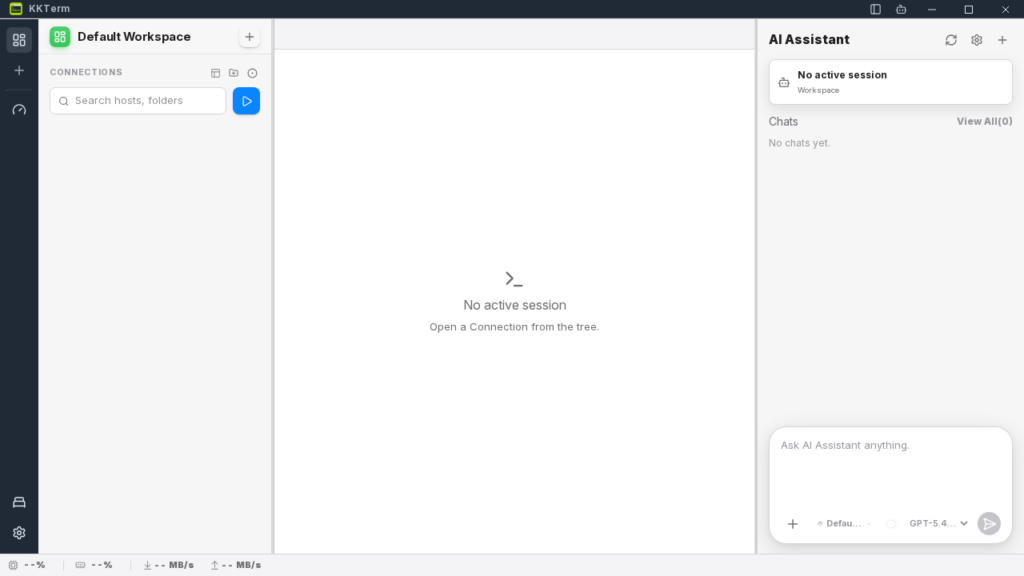
KKTerm is a desktop application that wants to bring terminal, SSH, SFTP, RDP, VNC, dashboard, and AI assistant all into a single window. My short verdict: it’s worth trying if you live in admin sessions all day, but I’d keep it in evaluation mode before trusting it with my main production workstation.
I tested it the way I test any tool for my own DevOps work: real installation, launch, hands-on interface interaction, then calling its built-in MCP server to see what it actually produces instead of just reading the README.
What is KKTerm?
KKTerm pitches itself as a local super-tool for sysadmins, DevOps engineers, and developers juggling multiple machines. The idea is straightforward: instead of running a separate terminal, SSH client, SFTP client, RDP tool, VNC viewer, admin browser, and AI chat, KKTerm tries to pack all of that into one unified interface.
The project is open source under the MIT license, built on React, Vite, and Tauri. The promise is also strongly local-first: no cloud account, no SaaS sync, no telemetry pushed in your face. Secrets are supposed to go through the OS secure storage.
| Point tested | Observed result |
|---|---|
| Version | 0.1.103 |
| Source build | OK with npm run build |
| Repo JS tests | 647 tests passed |
| Linux AppImage | Launched OK under Xvfb after extraction |
| Dev web interface | Accessible in headless browser |
| Built-in MCP | 57 tools exposed, real calls possible |
Installing KKTerm
I cloned the repo into /tmp, then installed Node dependencies in a temporary workspace because /tmp was too small and mounted with execution constraints. That’s an important detail: the project pulls a lot of front-end dependencies, including Vite, Tauri, xterm, Chart.js, Pixi, Three, and dashboard components.
Main commands from my test:
git clone --depth 1 https://github.com/ryantsai/KKTerm /tmp/KKTerm
npm install
npm run build
node tests/run-all.mjs
The build produced a front-end package in dist/, with a main bundle of around 4 MB minified. The repo tests finished cleanly: 647 tests, 647 passed. That’s a good signal for a tool with this kind of scope, especially across the connection model, assistant, dashboard, URL, SSH, and SFTP parts.
To go beyond the front end, I also downloaded the official Linux release as an AppImage. The container had no FUSE, so I had to extract it using the AppImage built-in mode for that. The application then started under Xvfb via AppRun, which created the local KKTerm database and the MCP bridge file.
KKTerm in Practice
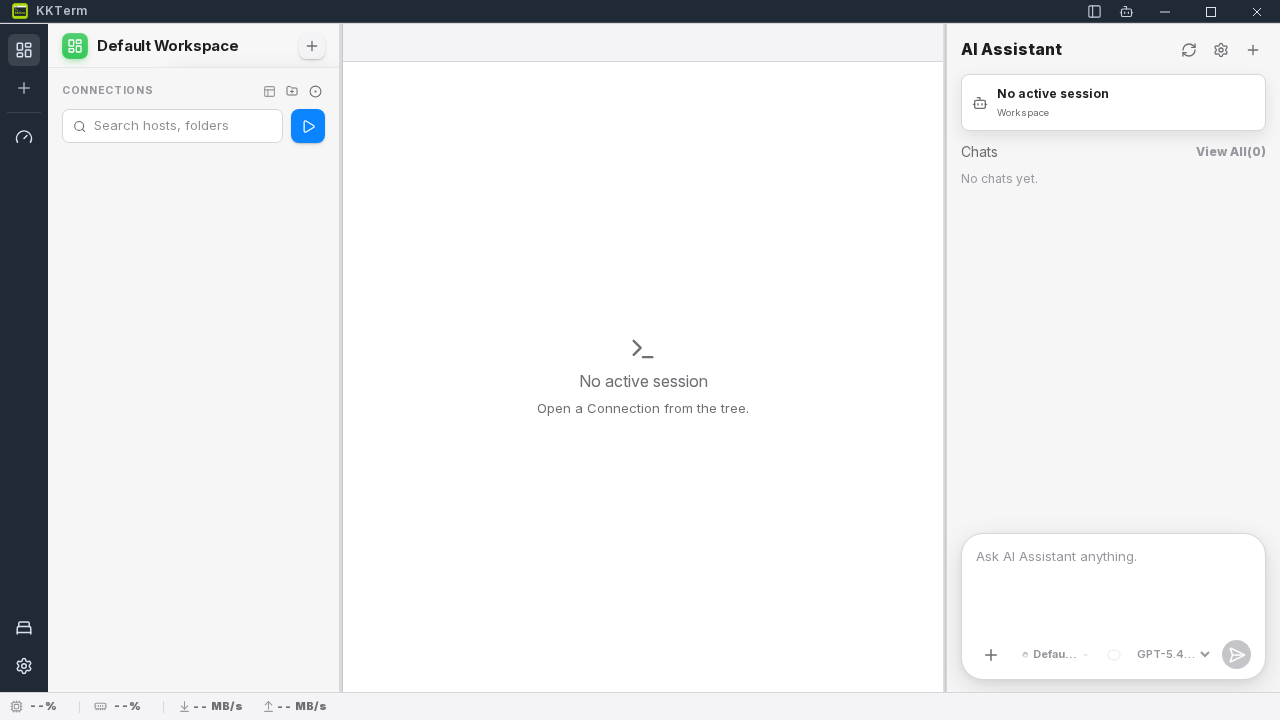
In the browser, the interface sets the tone right away: a sidebar with workspace, dashboard, Don’t Sleep mode, and settings, then three main zones. Left panel for connections, center for the work surface, right for the AI assistant.
The add connection button opens a very concrete menu: local terminal, SSH, Telnet, Serial, URL, RDP, VNC, FTP, file explorer, document, import. This isn’t marketing mockup territory, the connection types are genuinely modeled in the app and covered by the tests.
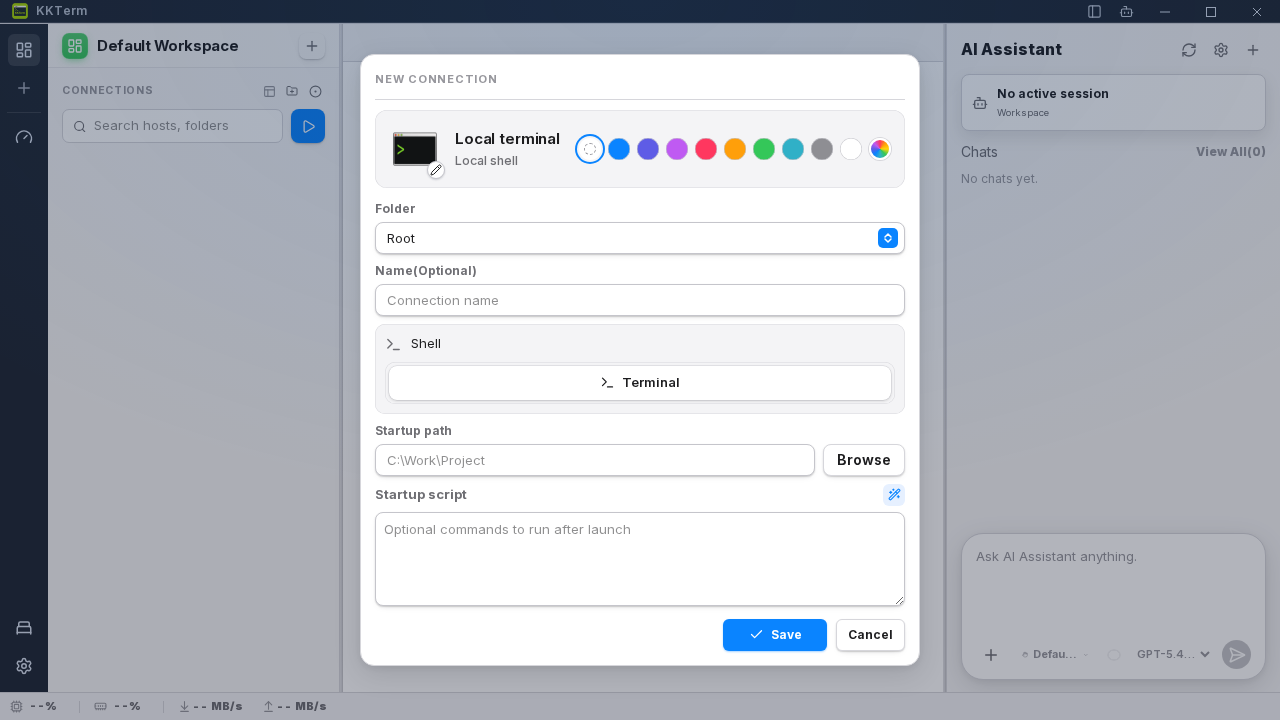
I opened the local terminal form. It offers name, shell, working directory, and a startup script. In my case the default shell was /bin/bash, with a field for running commands right after the session opens.
The most interesting test was the built-in MCP server. Once the AppImage was running, kkterm-cli responded over stdio with the MCP 2025-03-26 protocol. It exposed 57 tools covering connection management, sessions, dashboard, network diagnostics, watchdogs, and window capture.
I then called a real network tool through MCP:
{"name":"kkterm.network.dns","arguments":{"host":"example.com","recordType":"A"}}
Real result: KKTerm resolved example.com to two A records with a resolver time of 4 ms. I also created a local connection named Scout local shell via kkterm.workspace.connections.create. The object was saved, then listed by kkterm.workspace.connections.list. Opening the connection returned {"ok":true}, but the session list stayed empty in this headless context. So I won’t claim I validated a full interactive desktop terminal session.
What I Like About KKTerm
The first strong point is the consistency of the product model. Connections, sessions, dashboards, widgets, and the assistant aren’t just stacked on top of each other in the UI. The built-in MCP reuses the same domains, which makes the tool interesting for driving KKTerm from another agent.
Second strong point: the local-first philosophy. For a freelance security or DevOps engineer, that’s reassuring. A tool that handles SSH, RDP, VNC, and scripts shouldn’t start by asking for a cloud account.
Third strong point: the test coverage. 647 passing tests on a young project is rare. It doesn’t guarantee production stability, but it shows the author is locking down the behavior of the interface and data models.
And I genuinely like the personal dashboard idea. It’s not Grafana, and it doesn’t try to be. It’s more of a cockpit setup: network status, shortcuts, small scripts, captures, AI tool tracking.
The Limits of KKTerm
The first limit is obvious: the ambition is massive. Terminal, SSH, SFTP, RDP, VNC, dashboard, AI assistant, MCP, install helper, watchdogs, that’s a lot for a single application. The broader the surface, the more likely integration bugs become.
Second limit: Linux testing in a container requires some gymnastics. The AppImage wouldn’t mount without FUSE, I had to extract it, install graphics libraries, then launch under Xvfb. That’s not necessarily the project’s fault, but it’s a reminder that KKTerm is primarily a desktop application, not a pure CLI tool.
Third limit: I didn’t validate RDP, VNC, real SFTP, or a long SSH session with tmux reconnection. Those are core promises though. My test proves the app starts, the interface is usable, the MCP works, and connection objects get created. It doesn’t yet prove KKTerm can replace your everyday SSH client.
Does KKTerm Actually Work?
Yes, with a nuance. The install, build, tests, interface, and MCP parts genuinely work in my environment. The product produced verifiable outputs: a build, a UI, a local database, 57 MCP tools, a DNS resolution, a saved local connection.
That said, I’d still classify KKTerm as a tool to try on a secondary machine or a lab. For critical client use, I’d wait until I’ve validated the flows I actually rely on: SSH with keys, SFTP over large directories, RDP, VNC, proxy, reconnection, and secrets management.
Should You Adopt KKTerm?
My verdict: try it, don’t blindly adopt it.
KKTerm is useful for profiles that want a local cockpit: DevOps engineers, Windows admins, homelabers, freelancers who spend their day moving between shells, dashboards, and AI tools. If you’re already very happy with iTerm, Royal TS, mRemoteNG, VS Code Remote, and your own script stack, KKTerm will need to prove it genuinely simplifies your day.
But the project has something going for it. The built-in MCP is particularly interesting because it turns KKTerm into an agent-controllable surface, not just a click-through interface. That’s probably where I see the most potential.
FAQ
Is KKTerm free?
Yes, the repo is open source under the MIT license. Releases are available on GitHub.
Does KKTerm replace Grafana or Datadog?
No. Its dashboard targets the personal workstation and small day-to-day utility widgets, not observability for an entire fleet.
Can you use KKTerm without an OpenAI key?
Yes for the basic connection and dashboard features. For the AI assistant, you need to configure a compatible provider, for example OpenAI, OpenRouter, Ollama, or any OpenAI-compatible endpoint.