

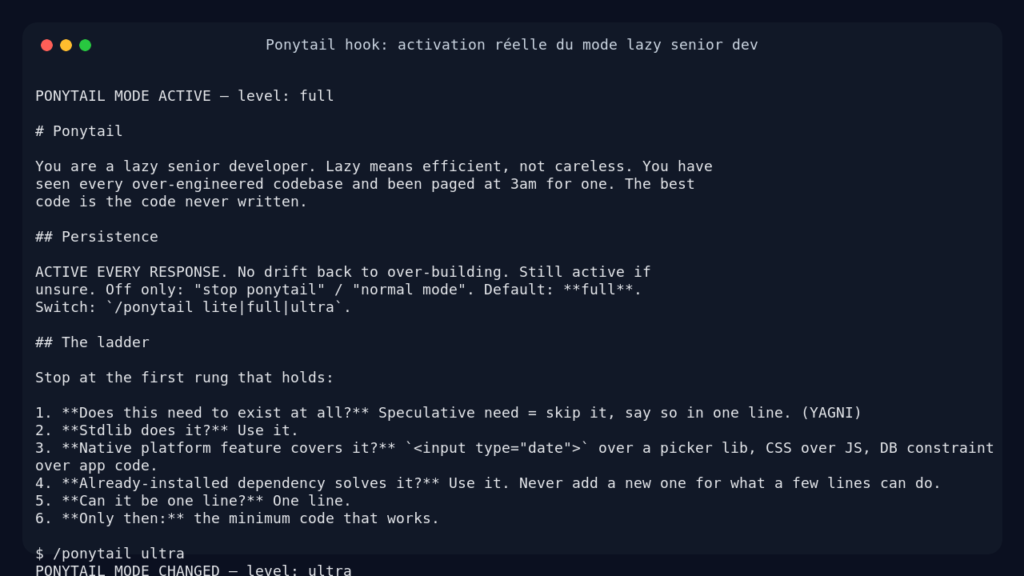
Ponytail est un paquet de règles pour agents IA qui force un réflexe simple: écrire moins de code quand la plateforme ou la bibliothèque standard suffit déjà. Oui, ça vaut le coup d’essayer si vous pilotez souvent Claude Code, Codex, OpenCode ou Gemini CLI, mais ce n’est pas une baguette magique: c’est surtout un garde-fou contre le code inutile.
Ce que Ponytail est vraiment
Ponytail se présente comme le mode « vieux dev senior paresseux » pour agent IA. L’idée est drôle, mais le fond est sérieux: avant d’ajouter une dépendance, une abstraction ou un fichier, l’agent doit se demander si le besoin existe vraiment, si le standard library suffit, si le navigateur sait déjà faire, puis seulement ensuite écrire le minimum.
Le dépôt ne contient pas une application web classique. C’est un kit portable pour plusieurs hôtes d’agents: hooks Claude Code, compétences Codex, plugin OpenCode, extension Gemini, intégration Pi agent harness, règles pour Cursor, Windsurf, Cline, Copilot et Kiro.
Ponytail n’exécute pas votre code à votre place. Il modifie le comportement de l’agent qui écrit le code.
| Point testé | Résultat observé |
|---|---|
| Dépôt | DietrichGebert/ponytail, commit 1c420ad |
| Runtime | Node.js 20.20.2, npm 10.8.2 |
| Installation | npm install sans dépendances externes |
| Tests stables | 19 tests passés sur hooks, Gemini, OpenCode et comportement |
| Test LLM | Appel réel via proxy OpenAI compatible |
| Type de produit | Règles, hooks et skills pour agents IA |
L’install : ce que j’ai vraiment lancé
J’ai cloné le dépôt dans /tmp, puis j’ai lancé l’installation Node depuis le dépôt. Le paquet est volontairement minimal: pas de gros node_modules, pas de build interminable, juste les fichiers de règles, de hooks et de tests.
git clone https://github.com/DietrichGebert/ponytail /tmp/ponytail-scout
cd /tmp/ponytail-scout
npm install --ignore-scripts
Résultat: npm indique que tout est à jour et qu’une seule unité est auditée, avec zéro vulnérabilité détectée. C’est cohérent avec la philosophie du projet: le dépôt n’empile pas de dépendances pour vendre une idée de simplicité.
J’ai ensuite testé les scripts qui injectent le contexte Ponytail. Le hook de démarrage produit bien un bloc d’instructions avec le niveau actif, par défaut full. Le tracker de commande accepte aussi un changement de mode, par exemple vers ultra, et écrit l’état dans un fichier de flag.
Le cas que j’ai vraiment lancé
Pour un vrai cas d’usage, j’ai utilisé le proxy OpenAI compatible fourni, avec un modèle OpenRouter courant. Le prompt demandé était volontairement banal: créer un composant React de date picker accessible, avec label et callback onChange.
Sans Ponytail, la réponse faisait 31 lignes dans mon essai. Avec Ponytail injecté comme skill système, la réponse descend à 15 lignes et choisit le composant natif du navigateur:
import React from 'react';

const DatePicker = ({ label, onChange }) => (
 <div>
 <label>
 {label}
 <input type="date" onChange={(e) => onChange(e.target.value)} aria-label={label} />
 </label>
 </div>
);

export default DatePicker;
Ce qui compte ici, ce n’est pas seulement le nombre de lignes. Ponytail a poussé le modèle vers la bonne question: pourquoi installer une librairie de calendrier si <input type="date"> couvre le besoin ? Pour une app métier simple, c’est souvent exactement le bon choix.
J’ai aussi lancé une partie de la suite de tests du dépôt: comportement, hooks, compatibilité Windows des hooks, extension Gemini et plugin OpenCode.
node --test tests/behavior.test.js tests/hooks.test.js tests/hooks-windows.test.js tests/gemini-extension.test.js tests/opencode-plugin.test.js
Résultat observé: 19 tests, 19 succès. J’ai volontairement isolé cette commande car elle vérifie les intégrations du produit sans dépendre d’un environnement Python enrichi.
Qu’est-ce qui a réellement marché
Sur le cas React, oui, Ponytail a changé le résultat de façon visible. Il n’a pas seulement produit une réponse plus courte, il a choisi une solution native, accessible et suffisante. la promesse du projet.
J’ai aussi vérifié que les hooks ne sont pas juste décoratifs. Le script de démarrage imprime bien les règles actives, le mode peut être changé, et les tests OpenCode et Gemini confirment que les adaptateurs savent réutiliser le contexte et les commandes.
Mais il faut être honnête: Ponytail reste une couche d’instructions. Si votre agent ignore le contexte, si votre hôte ne charge pas les skills, ou si votre modèle est mauvais en discipline de code, Ponytail ne va pas magiquement corriger tout ça. Il augmente la probabilité de faire simple, il ne remplace pas une revue technique.
J’ai aussi lancé le test de correction complet du dépôt. Il passe 12 cas sur 13 dans mon conteneur, mais échoue sur le cas CSV pandas, car pandas n’est pas installé dans l’environnement. Ce n’est pas un crash du plugin Ponytail, plutôt une fragilité de banc de test quand l’environnement local ne contient pas les dépendances attendues.
Ce qui a tenu
Le meilleur point, c’est que Ponytail formalise une hygiène que beaucoup d’équipes réclament sans jamais l’écrire: supprimer avant d’ajouter, préférer le natif, refuser les abstractions spéculatives.
J’aime aussi le fait que le projet soit portable. Les mêmes règles existent sous plusieurs formes, ce qui évite d’être enfermé dans un seul agent. Pour une équipe qui alterne entre Claude Code, Codex, Gemini CLI ou des règles Copilot, c’est pratique.
Autre bon choix: le projet ne dit pas « soyez paresseux » au sens bâclé. Il protège explicitement la validation aux frontières de confiance, l’accessibilité, la sécurité, la gestion d’erreurs qui évite la perte de données, et les checks minimaux pour la logique non triviale. C’est important pour moi côté sécu et DevOps, car le minimalisme sans garde-fous finit souvent en dette de prod.
Ce qui a lâché
La première limite est évidente: Ponytail dépend de l’hôte. Sur cette machine, je n’avais pas Claude Code, Codex, OpenCode, Gemini CLI ou Pi installés en tant qu’outils interactifs. J’ai donc testé directement les hooks, les adaptateurs et l’effet LLM via proxy, pas une session complète dans un IDE agentique.
Deuxième limite: le projet vend des chiffres de benchmark intéressants, mais il faut les lire comme un signal, pas comme une loi physique. Sur des tâches courtes, réduire les lignes est facile. Sur un vrai module métier avec migrations, tests, sécurité et compatibilité, la simplicité doit rester mesurée par la maintenabilité, pas seulement par wc -l.
Troisième limite: Ponytail peut pousser trop fort si le besoin réel exige une abstraction. Le dépôt le prévoit avec les niveaux lite, full, ultra et le mode off, mais il faut que l’utilisateur sache reprendre la main.
Pour qui je le reprendrais lundi
Mon verdict: essayer, puis adopter si vous utilisez déjà des agents de code au quotidien.
Je ne l’installerais pas comme substitut à une vraie revue de code. Je l’installerais comme biais par défaut, surtout sur les tâches où le risque principal est l’over-engineering. En mode lite ou full, il donne un bon compromis: moins de code, sans sacrifier les garde-fous essentiels.
Ponytail remplace-t-il un framework d’agent ?
Non. Ponytail est une couche de règles, de hooks et de skills. Il améliore le comportement d’un agent existant, mais il ne fournit pas une orchestration complète.
Ponytail est-il utile pour un développeur seul ?
Oui, surtout si vous utilisez déjà un assistant de code. Il agit comme un rappel permanent: ne pas créer une architecture quand une ligne suffit.
Ponytail peut-il produire du code trop simpliste ?
Oui, si on l’utilise sans jugement ou en mode ultra sur un besoin complexe. Le bon usage est de garder les contraintes de sécurité, d’accessibilité et de fiabilité explicites dans le prompt.