


Spool is a local library for finding, pinning, and searching through Claude Code, Codex, Gemini, and OpenCode sessions. My quick verdict: worth testing if you use code agents regularly, especially for search and secret scanning, but you need to accept that it’s still a young product.
What is Spool?
Spool addresses a very concrete problem: AI coding agents quickly generate a huge amount of session history. A Codex conversation about an incident, a Claude Code session on a migration, an old prompt where you pasted a log snippet, all of that ends up in local files but rarely somewhere easy to browse.
The project offers a local indexing layer. It reads session directories from Claude Code, Codex, Gemini, and OpenCode, creates a SQLite database with FTS5, then exposes an Electron desktop app and a spool CLI.
The key security promise is simple: nothing leaves your machine. The built-in secret scanner works locally, using deterministic regex rules. In my context as a security and DevOps freelancer, that’s exactly the kind of detail that matters, because agent transcripts often contain internal paths, configuration snippets, client names, and sometimes secrets.
| Element | Observed detail |
|---|---|
| Version tested | 0.5.2 from the GitHub repository |
| Stack | TypeScript, Electron, React, SQLite, FTS5, better-sqlite3 |
| Interfaces | Desktop app and official CLI |
| Data | Local storage in ~/.spool or SPOOL_DATA_DIR |
| Sources | Claude, Codex, Gemini, OpenCode |
| Security | Local secret and PII scanning via @spool-lab/redact |
Installing Spool
I cloned the repository into /tmp, read through the README and the CLI, core, and app packages, then installed dependencies with pnpm. The first attempt in /tmp failed due to insufficient disk space during the heavy dependency installation. So I kept the inspection clone in /tmp and used a temporary scratch folder for the actual install, which I deleted afterward.
Useful commands:
git clone --depth 1 https://github.com/paperboytm/spool /tmp/spool-scout
pnpm install --frozen-lockfile
pnpm --filter @spool-lab/redact build
pnpm --filter @spool-lab/core build
pnpm --filter @spool-lab/cli build
pnpm --filter @spool-lab/core test
The engine and CLI built cleanly. The core tests actually ran: 44 test files passed, 394 tests passed, 1 skipped. The better-sqlite3 native module was rebuilt for Node before the tests, as the README recommends.
One thing worth noting: Spool didn’t ask me for an LLM key for this scenario. I had OpenAI and OpenRouter variables pointed at a local proxy, but the parts I tested (indexing, search, doctor, and local scanning) didn’t need them.
Spool in practice
To avoid scanning a real private history, I created a realistic mini history: one Claude Code session on a Stripe configuration audit and one Codex session on GitHub key rotation. The files were in the JSONL format expected by Spool’s parsers, with a shared project at /workspace/client-api.
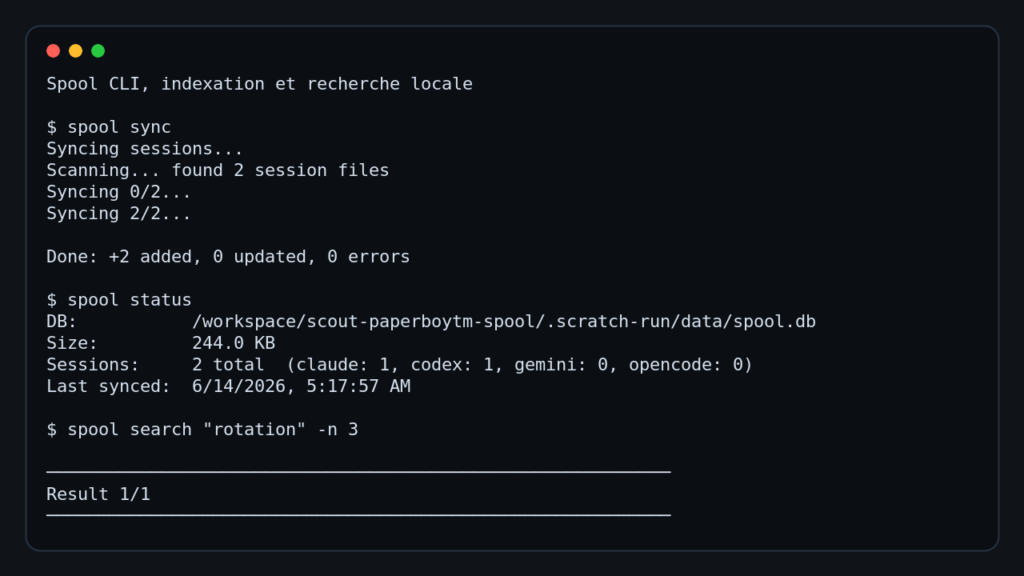
I then isolated the database with SPOOL_DATA_DIR and ran:
spool sync
spool status
spool search "rotation" -n 3
spool projects
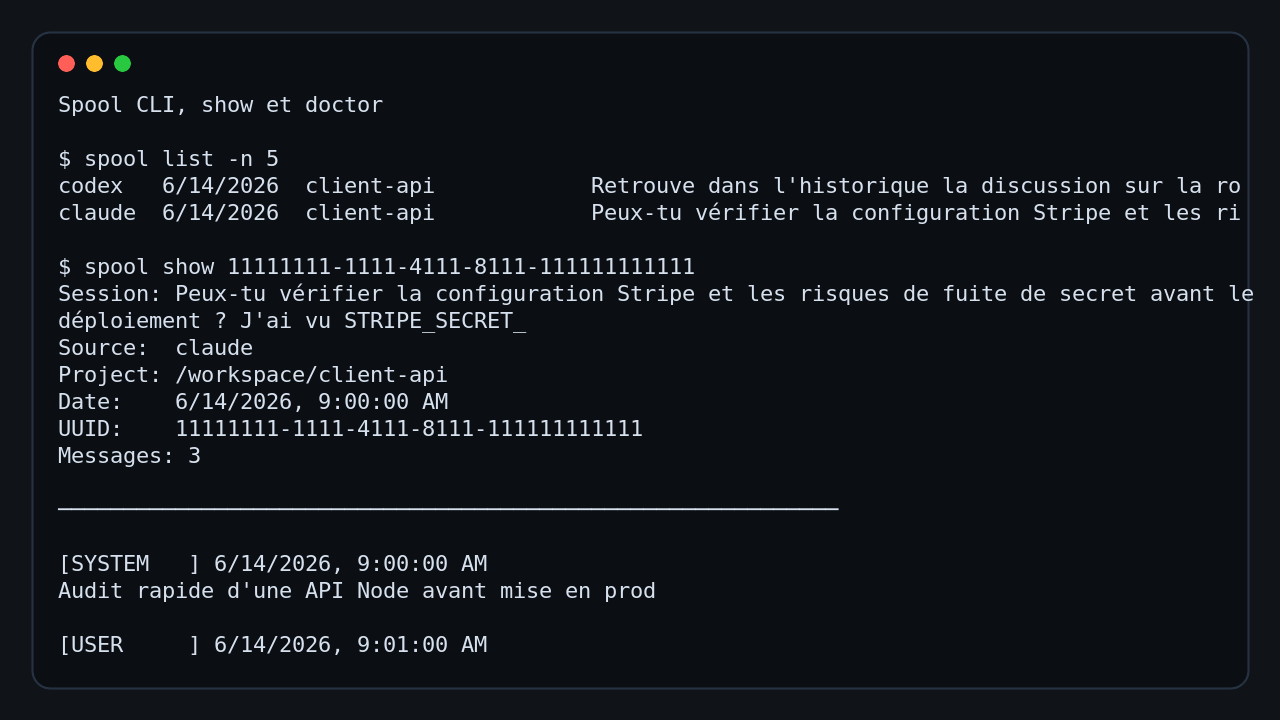
spool list -n 5
spool show 11111111-1111-4111-8111-111111111111
spool pin <uuid>
spool pinned
spool doctor
What Spool produced:
- a local SQLite database
spool.db, around 244 to 256 KB in this test - 2 indexed sessions, 1 Claude and 1 Codex
- a
client-apiproject grouping - full-text search returning the Codex session for the word
rotation - a tailored resume command, for example
codex resume <uuid> - a detailed message view with roles, dates, model, and tools used
- a persistent pin visible via
spool pinned - a clean
spool doctoroutput: 13 checks OK, 0 warnings, 0 errors
Search is the immediate standout. For my rotation query, Spool didn’t just say it found something. It displayed the source, project, session title, date, UUID, and the relevant excerpt. For tracking down a technical decision made three days earlier in an agent session, that’s exactly the right level of detail.
Does the Spool Security Scan actually work?
I also tested the secret scanner, not just read the docs. I injected fake but realistically shaped values into the transcripts: an environment variable in secret form and an API key in a recognized format. Then I called the core scan API with the local regex provider that Spool uses.
Observed result: 2 sessions scanned, 2 active findings. Spool classified both as high severity: one env-var and one api-key, with the regex provider. The values appear masked in the output, which is the expected behavior for a secret review tool.
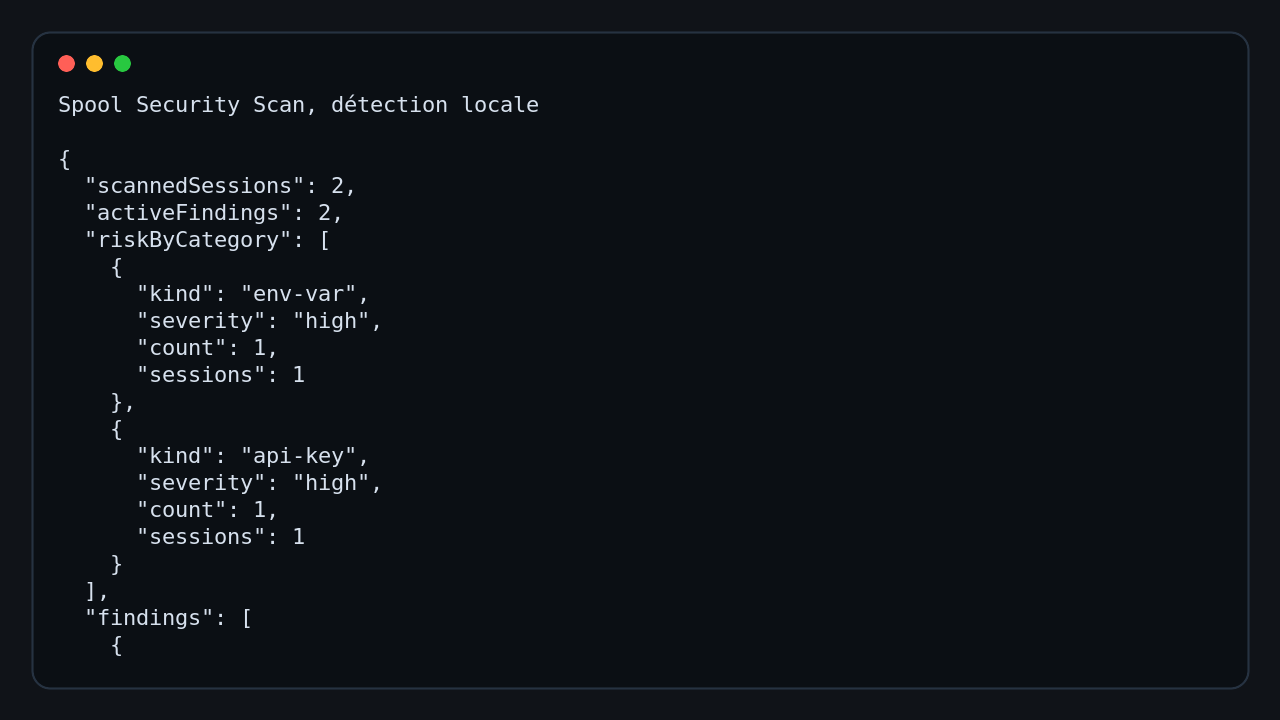
This test matters. Plenty of tools advertise secret detection but settle for a superficial scan or a cloud call. Here, the pipeline is local, reproducible, and tied to the indexed sessions. For a dev workstation or an admin machine, that’s reassuring.
What I like about Spool
First, the local-first approach is consistent. Agent sessions are inherently sensitive data, so indexing them locally in SQLite is the right call.
Second, the CLI is genuinely useful. Even without launching the desktop app, I could sync, search, display, pin, and diagnose the database. For a DevOps profile, that’s almost more important than a polished UI.
I also appreciate the multi-agent support. In many teams, session history is fragmented across Claude Code, Codex, Gemini, and sometimes OpenCode. Grouping by project rather than just by tool makes the library closer to how real workflows actually look.
Finally, spool doctor is solid. It checks the environment, the database, SQLite integrity, foreign keys, WAL mode, configuration, and the native module. For a desktop product with a local engine, that’s good practice.
Spool’s limitations
The first limitation is maturity. The README warns that Spool is early stage, and it shows during source installation: large monorepo, Electron, better-sqlite3, native rebuild, lots of dependencies. Nothing dramatic, but it’s not yet the experience of a small standalone binary.
The second limitation, in my test, is that I didn’t validate the Electron window in a graphical session. A Docker sandbox isn’t the ideal environment for a desktop app. So I tested the real engine and the official CLI, which covers indexing, search, pinning, doctor, and secret scanning, but not the full UI ergonomics.
Third limitation: quality necessarily depends on the parsers. If a tool changes its session format, Spool needs to keep up. The repo’s tests already cover Claude, Codex, Gemini, and OpenCode, but that’s an ongoing maintenance concern.
Should you adopt Spool?
My verdict: definitely try it, but adopt it gradually.
If you use a single agent once a week, Spool is probably too specialized. If you work daily with Claude Code, Codex, or OpenCode, it becomes interesting fast. Full-text search saves time, and the secret scanner adds a real local security layer.
For a security or DevOps freelancer, I’d put it in the keep-an-eye-on-it category. Not yet an obvious standard, but already solid enough to index a local history, track down a decision, pin an important session, and spot leaks in transcripts.
FAQ
Does Spool send my sessions to the cloud?
No, for the features tested here, everything stays local. The SQLite database and the secret scanner both run on your machine.
Can you use Spool without the desktop app?
Yes. The official CLI already lets you sync, search, display, pin, and diagnose sessions.
Is Spool ready for an entire team?
Not yet as a team platform. It’s mainly designed as a personal local library, with one database per machine and a privacy-first approach.